Viết theo CLI bản 0.3.4, ảnh chụp trên Windows PowerShell bản 0.3.3, dữ liệu thật đã được che. Xem đủ cờ lệnh tại developers.nextfarm.vn/docs/cli.
📌 Vị trí: Windows → Windows PowerShell → dán lệnh cài.
1. Dán lệnh cài
Mở Windows PowerShell. Không cần chạy bằng quyền quản trị.
irm https://developers.nextfarm.vn/install.ps1 | iex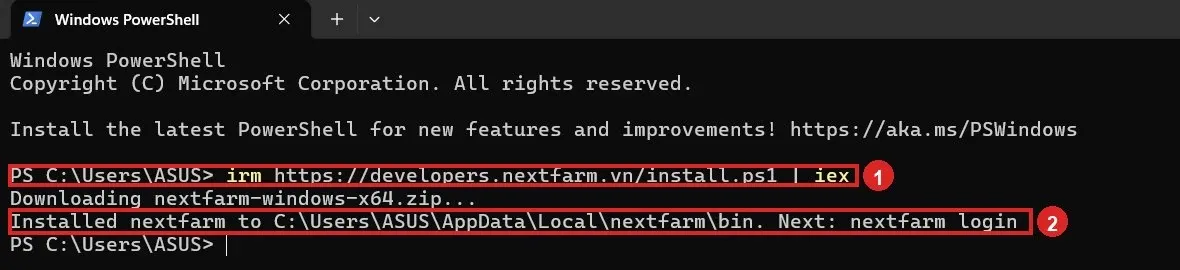
| Dòng script in ra | Ý nghĩa | Việc cần làm |
|---|---|---|
| Downloading nextfarm-windows-x64.zip | Tải gói Windows 64-bit từ bản phát hành và tải file SHA256SUMS. | Chờ tải xong. Script dừng nếu checksum không khớp. |
| Installed nextfarm to …\nextfarm\bin | Chương trình nằm ở %LOCALAPPDATA%\nextfarm\bin. | Gõ nextfarm login ở cửa sổ PowerShell mới. |
| Added … to your PATH | Thư mục bin được nối vào PATH của người dùng hiện tại. | Đóng PowerShell và mở lại thì máy mới nhận lệnh. |
💡 Cài đúng bản đang ghi trên trang tài liệu:$env:NEXTFARM_VERSION="0.3.4"; irm https://developers.nextfarm.vn/install.ps1 | iex. Đổi thư mục cài bằng$env:NEXTFARM_INSTALL_DIRtrước khi chạy lệnh.
⚠️ Nếu PowerShell chặn script, chạy Set-ExecutionPolicy -Scope CurrentUser RemoteSigned rồi dán lại lệnh cài. Đừng tắt bước kiểm SHA256.2. Kiểm tra phiên bản
Đóng cửa sổ vừa cài nếu script báo đã thêm PATH. Mở cửa sổ PowerShell mới.
nextfarm -vCùng một việc với nextfarm --version. Trang tài liệu ghi bản 0.3.3. Số in ra phải khớp bản vừa cài trước khi đăng nhập. Màn hình nextfarm status ở mục sau cũng ghi CLI 0.3.3. Mã nguồn và bản phát hành nằm ở nextx-organization/nextfarm-cli.
💡 Gợi ý phím Tab trên PowerShell: chạy nextfarm completion powershell rồi gắn đoạn in ra vào hồ sơ PowerShell.